Best free InDesign alternatives in 2026
Colby Flood · October 11, 2026 · 12 min read
InDesign is the tool behind most of the printed and paginated work you see, from a two-page brochure to a four-hundred-page book, and it comes with a subscription that small studios and one-person shops feel every month. This October also marks the end of Microsoft Publisher, which leaves a lot of offices looking for somewhere to make a newsletter. In 2026 the free field is more interesting than it has been in years: Affinity's layout app went free, Scribus keeps improving, the web tools cover the quick jobs, a typesetting language is winning over people who write long documents, and a new open source project reimplements InDesign's own panels, composer and shortcuts.
This guide compares eight free InDesign alternatives on the things that decide whether a switch sticks: whether it does real print production, how well it sets type, whether long documents with styles, footnotes and an index are possible, whether your InDesign habits carry over, and what "free" actually means in each case. The list starts with our pick, and every entry says where it falls short.
Quick picks
- Our pick: DesignCraft, open source, built to InDesign's own panels, composer and shortcuts, print-ready PDF, Mac, Windows and Linux, no subscription. Young, so build the next brochure in it rather than the next book.
- Most complete free layout app: Affinity, free since October 2025.
- Deepest open source page layout tool: Scribus 1.6.
- Quick marketing pieces with templates: Canva's free plan.
- Newsletters and simple documents: LibreOffice.
- A commercial layout app with a free edition: VivaDesigner.
- Templated brand documents in a browser: Marq's free plan.
- Long documents from text: Typst.
How we judged them
Print production. CMYK, spot colours, bleed and marks, embedded fonts, PDF/X, preflight. A tool that cannot hand a printer a clean file is not an InDesign alternative.
Typesetting. Paragraph composition, hyphenation and justification, baseline grids, widows and orphans. The difference between a page that looks designed and one that looks typed.
Long documents. Threaded stories, parent pages, styles, tables, footnotes, cross-references, an index. Books and reports need all of them.
Muscle memory. Whether the panels, tools and shortcuts carry over, or every day starts with a search.
What free means. Open source and free for good is one thing. A company's free app that could change tomorrow is another. A free tier with document caps is a third. We name the catch each time.
1. DesignCraft
DesignCraft is an open source page layout app for Mac, Windows and Linux with spreads and parent pages, frames and threaded stories, paragraph, character and object styles, swatches, text wrap, tables, footnotes, cross-references and an index, and export to PDF with embedded fonts, CMYK and spot separations, bleed and marks. It is a native app written in Rust, it runs offline, it never asks for a subscription, an account or a card, and it is released under the Apache 2.0 licence.
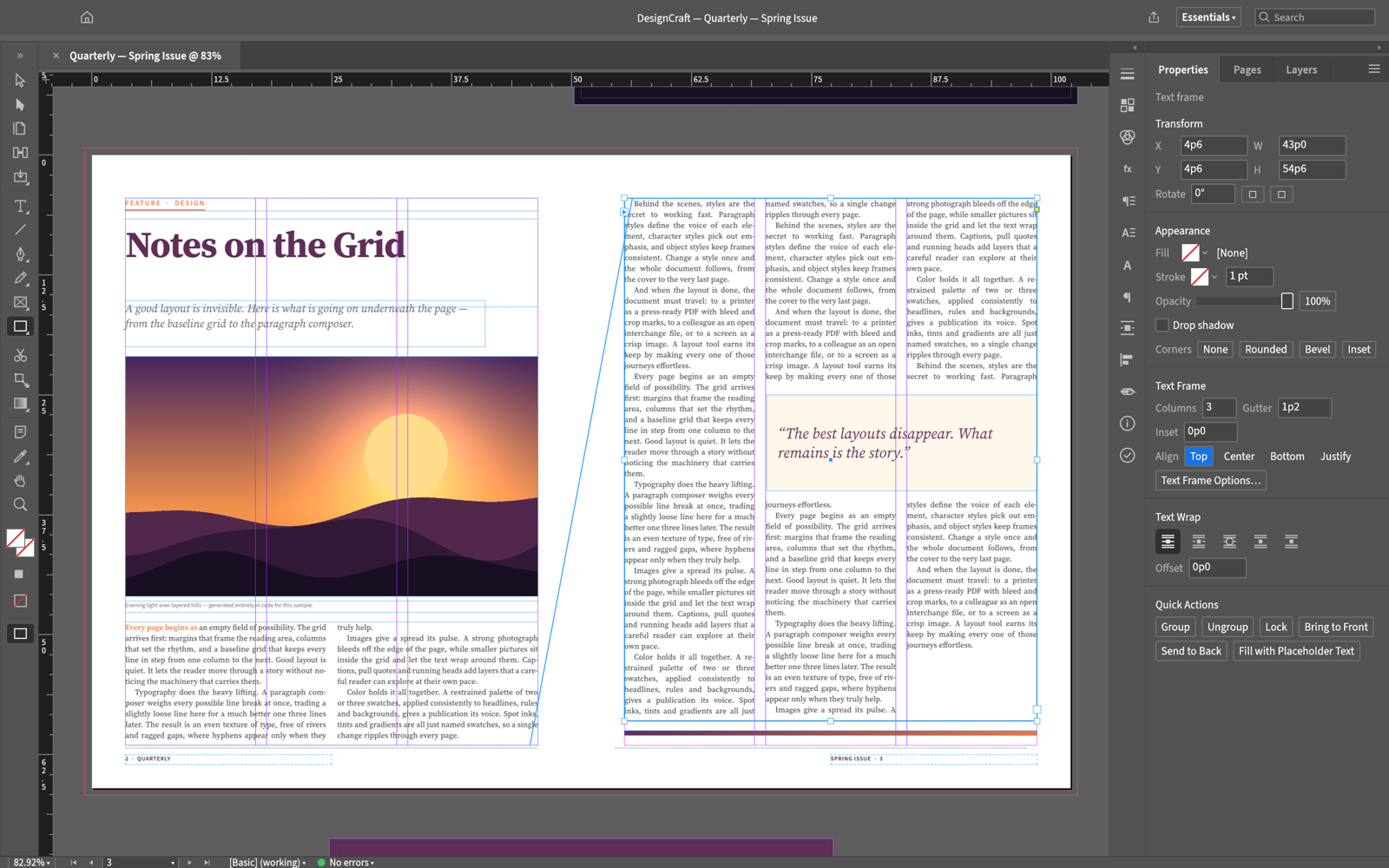
Screenshot: ArtCraft, from the project's own documentation.
What it is good at. Laying out pages the way you already do. It is a clean-room reimplementation of InDesign, so the Control panel, the Pages, Layers, Swatches, Styles, Character, Paragraph, Stroke and Text Wrap panels, the Pen and Direct Selection tools, snapping and smart guides, Find and Change with GREP, the Story Editor and Quick Apply all sit where you expect, down to the shortcuts. Paragraphs are composed with a Knuth-Plass composer, the same approach as InDesign's paragraph composer, with dictionary hyphenation, justification by word, letter and glyph scaling, keep options, widows and orphans, optical margin alignment, baseline grids and vertical justification, and line breaks are identical on screen and in the PDF. A Links panel knows when a placed image has changed on disk, and Preflight and Find Font flag missing fonts before they reach a printer.
Screenshot: ArtCraft, from the project's own documentation.
The catches. The project is young, its first commit was 1 October 2026, and it says so: it aims at full InDesign parity and is moving fast, with a status list in its roadmap rather than a finished feature set. For a brochure, a report or a magazine built from styles, frames and placed images, the pieces are there today; a four-hundred-page book with every InDesign feature is not what it claims yet. A release lands most weeks, so features move between versions.
Who it suits. InDesign users who want the same panels and composer without the subscription, studios on Linux, and anyone who wants their layouts in software they own.
2. Affinity
Affinity used to sell a layout app, Publisher, as a one-time purchase that designers recommended as the InDesign alternative. In October 2025 Canva, which bought the company, relaunched the three Affinity apps as a single free application that combines page layout, vector design and photo editing, on Mac and Windows with iPad versions as well.
What it is good at. The most complete free layout toolset: parent pages, styles, tables, footnotes, cross-references, an index, real CMYK and spot colours, PDF/X export with bleed and marks, and IDML import so InDesign documents come across, with the vector and photo tools in the same document.
The catches. You sign up with a Canva account to use it, the generative AI tools live in Canva's paid plans, the old perpetual licences are gone, so the deal is "free for now under Canva's terms", it is not open source, and the interface is its own rather than InDesign's.
Who it suits. Studios that need print-ready work at no cost today and are comfortable with an account-based free product.
3. Scribus 1.6
Scribus is the open source desktop publishing program that print shops have accepted files from for twenty years: frames, styles, parent pages, tables, CMYK, spot colours, PDF/X export, preflight and colour management. The stable release is 1.6.6 from April 2026, and a 1.7 preview series is moving the application to a newer toolkit. It is GPL licensed on Linux, Windows and macOS.
What it is good at. Print production you can trust, with colour management and PDF/X output that passes a printer's checks, and a community that knows prepress.
The catches. The interface and the type tools feel a generation behind, long-document features such as footnotes and cross-references are weaker than InDesign's, InDesign files do not open, and the habits do not transfer.
Who it suits. Anyone who wants an open source tool with real prepress credentials and is willing to work its way.
4. Canva
Canva's free plan is where a lot of flyers, menus, social posts and one-page brochures get made: templates, drag-and-drop layout, a stock library with a free tier, and ordering of printed pieces from inside the app. It runs in a browser and on phones.
What it is good at. Quick marketing pieces by people who are not designers, with templates that look finished, and no learning curve.
The catches. It is a template tool, not a layout tool: no real typesetting, no parent pages or threaded text, no spot colours or proper bleed control, premium templates and brand tools are paid, and your work lives on Canva's servers.
Who it suits. Small businesses and marketers making short pieces, not anyone laying out a document.
5. LibreOffice
LibreOffice is the free office suite, and two of its parts cover more layout than people expect: Writer handles newsletters, reports and books with styles, sections, columns, tables, footnotes, cross-references, an index and PDF export, and Draw lays out single pages with frames and shapes. It is open source on every desktop, and it opens Word and Publisher-style jobs that Microsoft is walking away from.
What it is good at. Long text documents with real styles and a table of contents, newsletters and simple page layouts, for nothing.
The catches. It is a word processor and a drawing tool, not a page layout app: no spreads, no parent pages in the InDesign sense, no CMYK or spot colours, and typesetting that is adequate rather than fine.
Who it suits. Offices leaving Publisher, authors of reports and manuals, and anyone whose documents are mostly text.
6. VivaDesigner
VivaDesigner is a commercial page layout application from Germany with a permanent Free Edition that can be used for private and commercial work. It has the layout, typography and print output of a professional tool, with a browser version as well as desktop apps for Windows, macOS and Linux.
What it is good at. Real desktop publishing with a professional pedigree, and a free edition that keeps opening your documents even if you never pay.
The catches. The free edition is limited in ways the vendor does not spell out, so check its comparison table before you depend on it, it is closed source, and the interface is its own.
Who it suits. People who want a commercial layout app's polish and can live with a limited free edition or pay later.
7. Marq
Marq, the tool that used to be Lucidpress, is a browser-based layout tool built for brand-controlled documents: templates that a team fills in without breaking the design, with a free plan that covers a few documents.
What it is good at. Letting a sales or marketing team make on-brand one-pagers and proposals from templates a designer locked down.
The catches. The free plan caps the number of documents, it is a template system rather than a layout app, print output is basic, and it is a subscription product underneath.
Who it suits. Teams that need brand-safe templates more than they need typesetting.
8. Typst
Typst is a typesetting system: you write the document as text with a markup language, and the compiler produces a finished PDF with real paragraph composition, hyphenation, footnotes, cross-references, bibliographies and figures. Version 0.15 arrived in the summer of 2026 with variable fonts and multiple bibliographies. The compiler is open source under Apache 2.0 and there is a free web app with collaboration.
What it is good at. Long documents whose structure matters more than their art direction: reports, theses, manuals, books, with output quality that rivals the professional tools and a source file that lives happily in version control.
The catches. There is no page to drag things around on, so magazines and brochures are the wrong fit, print production features such as CMYK and bleed are limited, and it asks you to write markup rather than design on a canvas.
Who it suits. Writers, researchers and technical teams who produce long documents and would rather type than nudge.
How to choose
- You know InDesign and want the same panels without the subscription. DesignCraft, with the caveats above.
- You need the most complete free layout app for print today. Affinity.
- You want open source with prepress credentials. Scribus.
- You need a flyer by lunch. Canva.
- You are leaving Publisher. LibreOffice.
- You want a commercial app's polish for free. VivaDesigner's free edition.
- Your team needs locked-down brand templates. Marq.
- Your document is long and mostly text. Typst.
What you give up
Every option here gives up Adobe's workflow: the round trip to Illustrator and Photoshop, Adobe Fonts, the plug-in and script ecosystem, and the IDML exchange that print shops and translators assume. DesignCraft keeps the panels, the composer and the shortcuts but is still filling in the long-document edges. Affinity and Scribus give you real print production with different habits. If your work is books with every InDesign feature, or a print shop that insists on InDesign files, the honest answer may be the single-app subscription.
FAQ
Is there a free version of InDesign? No. Adobe offers a seven-day trial, and InDesign is otherwise subscription only, at around twenty-three dollars a month on its own on an annual plan. The tools above are free in different ways: open source and free for good (DesignCraft, Scribus, LibreOffice, Typst), a company's free app (Affinity, VivaDesigner's free edition), or a free tier with caps (Canva, Marq).
Which free alternative is most like InDesign? DesignCraft, because it reimplements InDesign's panels, paragraph composer and shortcuts on purpose. Affinity is the most complete today, with its own interface.
Can I open my InDesign files in these? Affinity imports IDML, the exchange format InDesign exports. The others do not open InDesign files; export a PDF or the text and rebuild the layout.
What should I use now that Publisher is gone? For newsletters, letterhead and certificates, LibreOffice Writer does the job for free. For brochures and posters, Affinity or Canva. Convert your .pub files to PDF before you lose access, because nothing else opens them.
Can I send these files to a printer? Affinity, Scribus and DesignCraft export PDF with CMYK, bleed and marks that a print shop accepts. Canva and Marq produce PDFs meant for their own print services or simple jobs. Typst and LibreOffice export clean PDFs for digital printing but not for a spot-colour press.
Looking for more? Every tool on Unmetered's free tools board is free software with full source, an install guide and a Claude Code prompt, under one licence for your organization.
Own the software you run.
Unmetered is a curated marketplace where vetted operators sell ready-to-run software, full source, one-time price, licensed to your organization forever.