Best free Illustrator alternatives in 2026
Colby Flood · October 29, 2026 · 11 min read
Illustrator is the tool every logo, icon and piece of print work seems to pass through, and the subscription that comes with it is the reason designers keep asking what else there is. In 2026 the free field has changed shape: Affinity went free, Inkscape kept maturing, two open source projects are building vector tools from scratch, the interface-design apps have free tiers that cover a lot of vector work, and one new project reimplements Illustrator's own panels, tools and shortcuts.
This guide compares eight free Illustrator alternatives on the things that decide whether a switch sticks: whether it opens and saves the files clients send, how its Pen tool and booleans behave, whether your muscle memory carries over, whether it does print as well as screen, and what "free" actually means in each case. The list starts with our pick, and every entry says where it falls short.
Quick picks
- Our pick: VectorCraft, open source, built to Illustrator's own layout, tools and shortcuts, opens .ai files, Mac, Windows and Linux, no subscription.
- Deepest open source vector editor: Inkscape 1.4.
- Closest to a full Illustrator replacement for print: Affinity, free since October 2025.
- Best open source tool for interfaces: Penpot.
- Most interesting new idea: Graphite, procedural and still in release candidates.
- If your vector work is screens: Figma's free plan.
- Illustration on an iPad or Mac, free to start: Linearity Curve.
- Diagrams and simple drawings: LibreOffice Draw.
How we judged them
The files. Whether it opens the .ai, EPS, PDF and SVG files clients send, and saves something they can open back.
Pen tool and booleans. The Pen tool is the job. Pathfinder operations that fail or leave stray points cost hours.
Muscle memory. Whether the panels, tools and shortcuts carry over, or every day starts with a search.
Print and screen. CMYK, bleed, PDF/X and packaging for print; artboards, export sets and SVG for screens. Few free tools do both.
What free means. Open source and free for good is one thing. A company's free app that could change tomorrow is another. A free tier with a file cap is a third. We name the catch each time.
1. VectorCraft
VectorCraft is an open source vector graphics editor for Mac, Windows and Linux with Illustrator's layout, tools, panels and shortcuts: the Pen and Direct Selection tools, Pathfinder and Shape Builder, gradients, appearance and transparency, type with styles, and files that go both ways, SVG, PDF and PDF-compatible .ai, EPS, DXF and the raster formats. It is a native app written in Rust, it runs offline, it never asks for a subscription, an account or a card, and it is released under the Apache 2.0 licence.
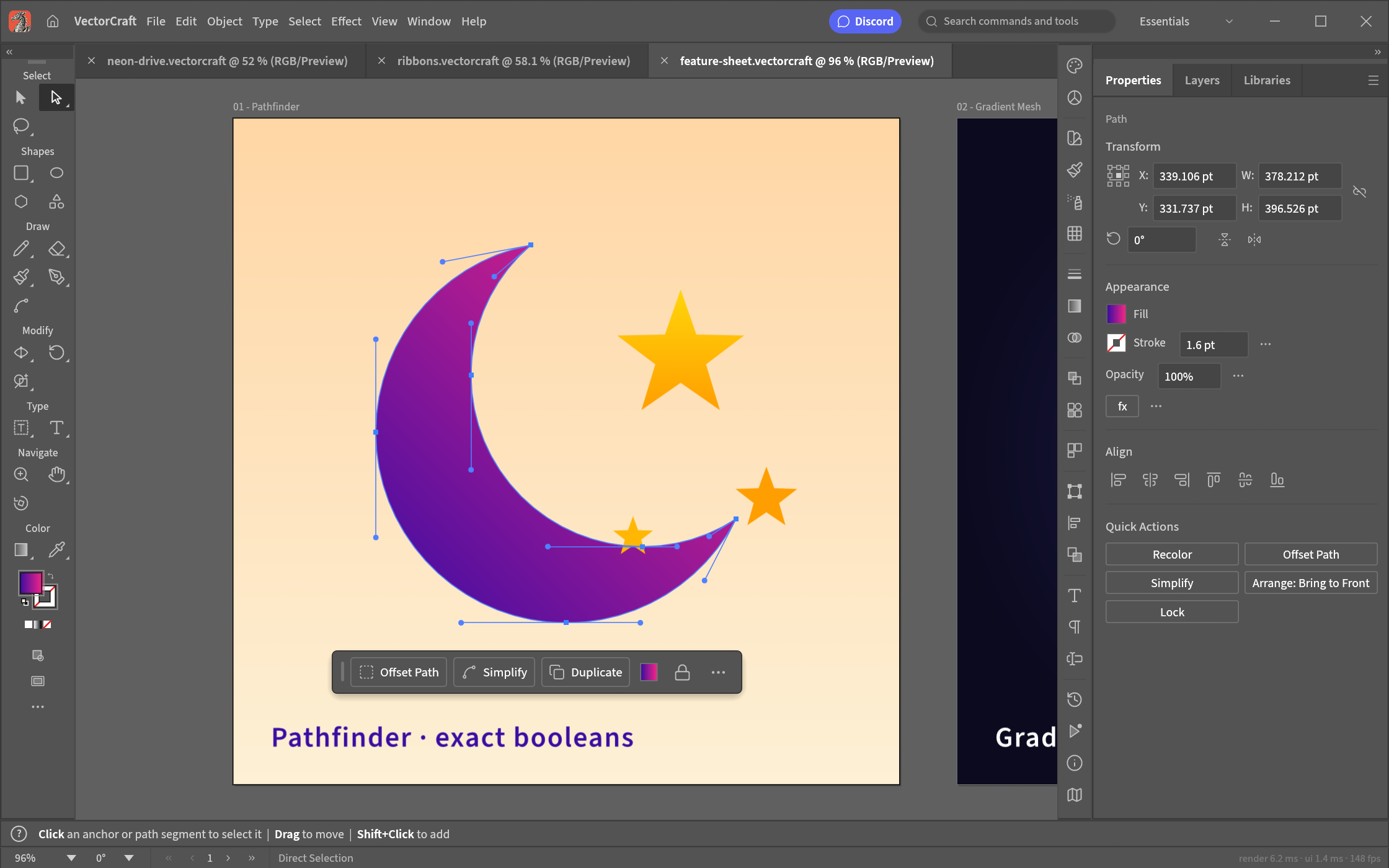
Screenshot: ArtCraft, from the project's own documentation.
What it is good at. Keeping your muscle memory. It is a clean-room reimplementation of Illustrator, so the Pen, Direct Selection, Pathfinder, Smart Guides, Appearance, Swatches and Layers panels sit where you expect and the shortcuts carry over. Curve booleans are exact, so Pathfinder never answers "cannot perform operation", undo is unlimited, and 20,000 shapes render in about 27 milliseconds while the interface stays smooth. Type supports styles, threading and Hebrew and Arabic layout. SVG is first class, PDF and PDF-compatible .ai files import and export with PDF/X, EPS, DXF, EMF and WMF come along, Export for Screens writes the asset sets a web or app project needs, Print and Package are there, and the native format is readable JSON that works in version control.
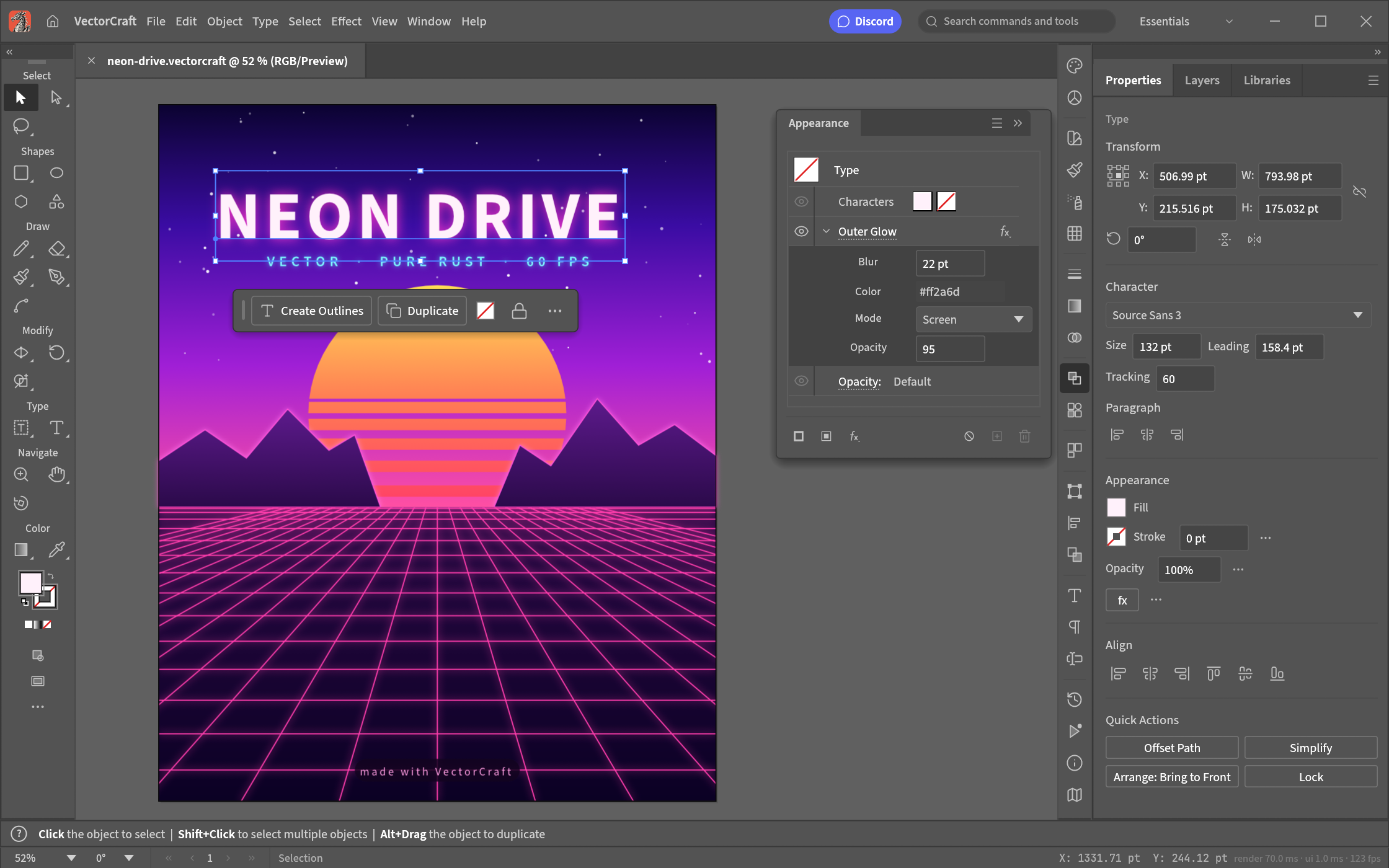
Screenshot: ArtCraft, from the project's own documentation.
The catches. The project tracks its own numbers honestly: roughly 69 to 75 percent of Illustrator's features exist and work, and 40 to 55 percent on the stricter test of whether a power user can tell the difference. Everyday vector illustration is close to usable; what is still missing is 3D and Materials, the Photoshop-style raster effects, vertical Chinese, Japanese and Korean composition, Variables and scripting, and a fidelity pass over every tool's modifiers. A release lands most weeks, so features move between versions.
Who it suits. Illustrator users who want the same tool without the subscription, studios that need to open the .ai files clients send on Linux, and anyone who wants version control on their artwork.
2. Inkscape 1.4
Inkscape is the open source vector editor with two decades behind it, and the 1.4 series is its most polished: a Shape Builder tool, a filter gallery, a redesigned swatches dialog, modular grids, a much better PDF import, and the 1.4.4 maintenance release in May 2026. It is GPL licensed on Linux, Windows and macOS, and SVG is its native format.
What it is good at. Deep SVG work, path editing, tracing bitmaps, extensions for everything from laser cutting to plotters, and a community that has answered every question twice.
The catches. The interface is Inkscape's, not Illustrator's, so habits do not transfer, CMYK and print production are weak, .ai files only come in through their PDF layer, and the next major release has been in development for a while.
Who it suits. Anyone who wants the most capable free vector editor and is willing to learn its way of doing things.
3. Affinity
Affinity was the one-time-purchase alternative designers recommended for years. In October 2025 Canva, which bought the company, relaunched it as a single free app that combines vector design, photo editing and page layout, replacing the three separate Affinity apps, on Mac and Windows with iPad versions as well.
What it is good at. A professional vector toolset with real CMYK, print output, artboards and type, plus photo editing and layout in the same document, and good import of .ai and PDF files.
The catches. You sign up with a Canva account to use it, the generative AI tools live in Canva's paid plans, the old perpetual licences are gone, so the deal is "free for now under Canva's terms", it is not open source, and the interface is its own.
Who it suits. Designers who need print-ready output at no cost and are comfortable with an account-based free product.
4. Penpot
Penpot is the open source design tool for interfaces and prototypes: boards, components, auto layout and CSS grid, a plugin system, version history, and vector tools good enough for icons and illustrations, in the browser or self-hosted on your own server. It is free, and the 2.x series through 2025 added grids, components and a new file format.
What it is good at. Interface design with a team, with no seat counts and no cloud you do not control, and vector work that ends up on a screen.
The catches. It is not built for print or illustration, .ai files do not open, and the vector tools are a subset of what an illustration app offers.
Who it suits. Product designers and teams who want an open source Figma more than an open source Illustrator.
5. Graphite
Graphite is a new open source graphics editor built around a node graph: every shape, fill and effect is a step in a procedural pipeline you can revisit, so artwork stays editable in ways a conventional vector app cannot manage. The web app is live and free, and desktop builds for Windows, Mac and Linux reached release candidates in January 2026.
What it is good at. Procedural and generative artwork, repeated elements that update together, and a fresh way of thinking about vector work.
The catches. It is somewhere between alpha and beta by its own account, the toolset is a fraction of Illustrator's, there is no timeline for a stable release, and nothing about it resembles Illustrator.
Who it suits. Curious designers and anyone making procedural artwork, not production illustration yet.
6. Figma's free plan
Figma's Starter plan is free, with vector tools, auto layout and components, limited to a handful of files and pages with a short version history. For icons, simple illustrations and anything destined for a screen, it is more vector editor than most people realise.
What it is good at. Screen graphics with collaboration built in, and the SVG export that the rest of the product pipeline expects.
The catches. The file and page caps on the free plan, no print output, no .ai import, a web app rather than software you own, and a company that changes its plans.
Who it suits. Product teams already in Figma whose vector needs are icons and interface art.
7. Linearity Curve
Linearity Curve, the app that used to be Vectornator, is an illustration and design tool for iPad, iPhone and Mac with a Pen tool, boolean operations, type, AI tracing and a template library. The free Starter plan is permanent but capped at three files; Pro removes the cap and unlocks exports, at a yearly price Linearity has been promoting hard.
What it is good at. Drawing with a pencil on an iPad, and quick social and marketing graphics from templates.
The catches. Apple platforms only, three files on the free plan, exports that push you toward Pro, and no open source escape hatch.
Who it suits. Illustrators on an iPad who want to start free and may pay later.
8. LibreOffice Draw
LibreOffice Draw is the vector drawing half of the free office suite: shapes, connectors, Bezier curves, layers and text on pages, with SVG, PDF and EPS import and export, on every desktop under an open source licence.
What it is good at. Diagrams, flowcharts, floor plans, simple logos and any drawing that is more geometry than illustration, with no learning curve for office users.
The catches. It is a drawing tool, not an illustration tool: no proper Pen tool workflow, no appearance stack, weak gradients and type, and no print production features.
Who it suits. People who need to draw a diagram today and already have LibreOffice.
How to choose
- You know Illustrator and want the same tool without the subscription. VectorCraft.
- You want the deepest free vector editor and will learn it. Inkscape.
- You need print-ready output at no cost. Affinity.
- Your vector work is interfaces. Penpot, or Figma's free plan.
- You draw on an iPad. Linearity Curve.
- You want to try something new. Graphite.
- You need a diagram. LibreOffice Draw.
What you give up
Every option here gives up Adobe's ecosystem: the round trip to Photoshop and InDesign, the 3D and Materials tools, Adobe Fonts and Stock, and the generative tools. VectorCraft keeps the panels, shortcuts and file formats but is still filling in the edges. Inkscape and Affinity give you capable tools with different habits. If the print pipeline and the Adobe round trip are the job, the honest answer may be the single-app subscription.
FAQ
Is there a free version of Illustrator? No. Adobe offers a seven-day trial, and Illustrator is otherwise subscription only, at around twenty-three dollars a month on its own on an annual plan. The tools above are free in different ways: open source and free for good (VectorCraft, Inkscape, Penpot, Graphite, LibreOffice Draw), a company's free app (Affinity), or a free tier with file caps (Figma, Linearity Curve).
Which free alternative is most like Illustrator? VectorCraft, because it reimplements Illustrator's layout, tools, panels and shortcuts on purpose and opens .ai files. Affinity is the most complete for print work, with its own interface.
Can I open .ai files in these? VectorCraft and Affinity open PDF-compatible .ai files, which is how Illustrator saves by default. Inkscape opens the PDF layer of an .ai file, with some loss. The others take SVG, PDF or EPS instead.
Which one is best for print? Affinity for CMYK, bleed and PDF/X today. VectorCraft has Print, Package and PDF/X export and is closing the gap. Inkscape can produce print files with effort and the right extensions.
Can I use these for client work? Yes. All eight allow commercial use. Open source licences such as the GPL and Apache 2.0 cover the software, not your artwork. Check the licences on fonts and stock assets as you would in Illustrator.
Looking for more? Every tool on Unmetered's free tools board is free software with full source, an install guide and a Claude Code prompt, under one licence for your organization.
Own the software you run.
Unmetered is a curated marketplace where vetted operators sell ready-to-run software, full source, one-time price, licensed to your organization forever.