Best free Lightroom alternatives in 2026
Colby Flood · October 20, 2026 · 11 min read
Lightroom is where most photographers keep their life's work, and the subscription that comes with it is the reason so many of them keep looking at the door. In 2026 the free field is better than it has ever been: darktable shipped its biggest release in years, digiKam rebuilt its interface, Google rebuilt Snapseed, and a new generation of open source editors reimplements Lightroom's own panels rather than asking you to learn a different layout.
This guide compares eight free Lightroom alternatives on the things that decide whether a switch sticks: whether your existing edits come across, how it handles RAW files from your camera, whether it manages a library or only develops single photos, what platforms it runs on, and what "free" actually means in each case. The list starts with our pick, and every entry says where it falls short.
Quick picks
- Our pick: LightCraft, open source, built to Lightroom's own panels, reads your Lightroom edits, Mac, Windows and Linux, no subscription.
- Deepest RAW developer: darktable 5.6.
- Best pure converter: RawTherapee.
- Best library manager: digiKam 9.
- Already on a Mac or iPhone: Apple Photos.
- Best on a phone: Snapseed, free with no ads.
- Adobe's own free option: Lightroom mobile's free plan, without RAW editing.
- Shooting one brand: your camera maker's own software.
How we judged them
Your existing edits. Whether the develop settings and presets in a Lightroom catalogue carry across, or whether every photo starts from scratch.
RAW support. Which cameras open properly, with real colour calibration, and which only open through an embedded preview.
Library or developer. Lightroom is both a catalogue and a darkroom. Some of these do one job, some do both.
Platforms. Mac, Windows and Linux on the desktop, and a phone for the quick edits.
What free means. Open source and free for good is one thing. A free tier that leaves out RAW editing is another. We name the catch each time.
1. LightCraft
LightCraft is an open source photo editor and library for Mac, Windows and Linux with the Light, Color, Effects, Tone Curve, Color Mixer and Color Grading panels, masking, presets and profiles, culling, albums and smart albums, and export with watermarks and naming templates. It is a native app written in Rust, it runs offline, it never asks for a subscription, an account or a card, and it is released under the Apache 2.0 licence.
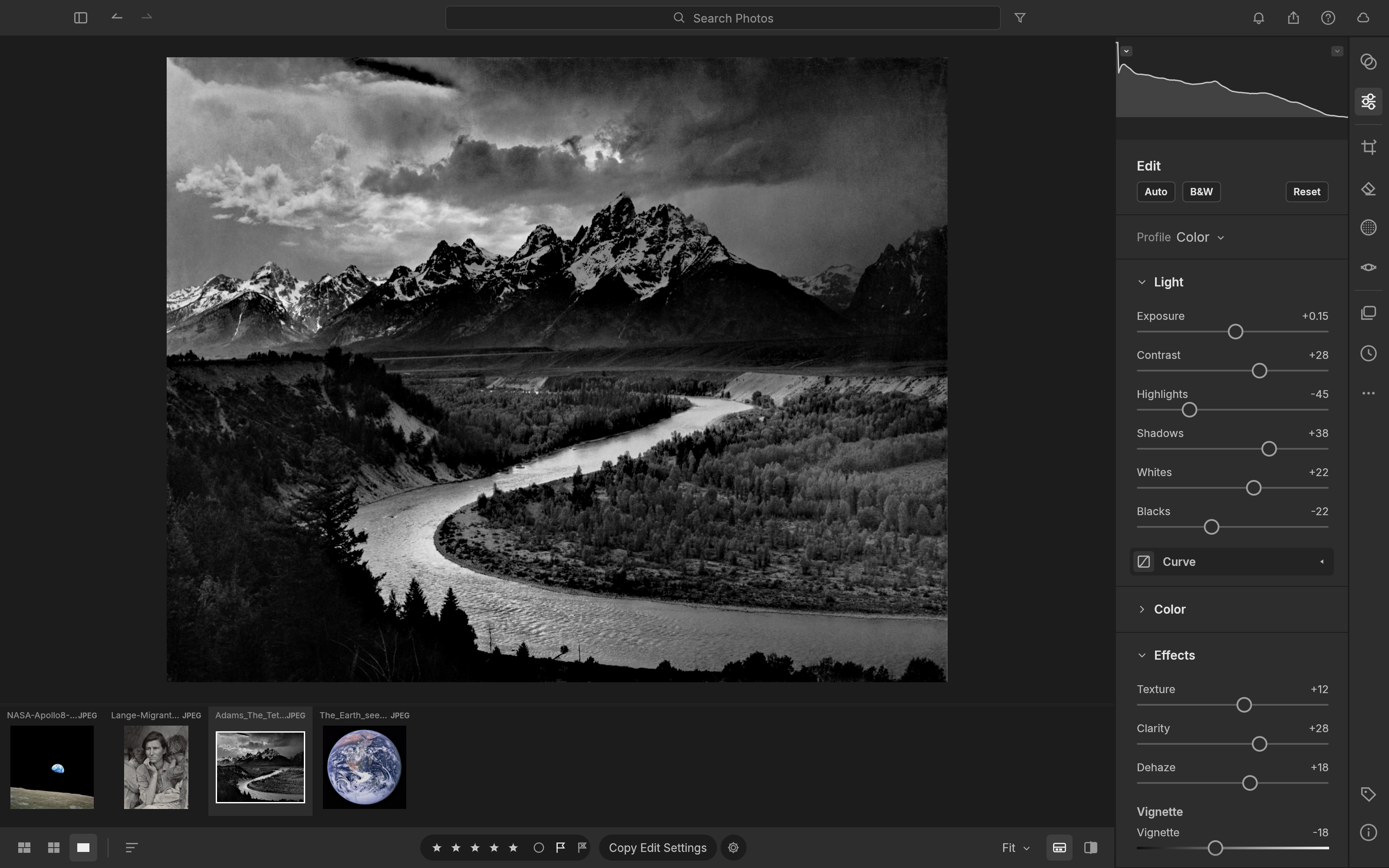
Screenshot: ArtCraft, from the project's own documentation.
What it is good at. It is a clean-room reimplementation of Lightroom, so the develop panels, keyboard shortcuts and library layout follow what a Lightroom user already knows. Import a shoot, cull it with Compare and Survey views and the pick, reject and star keys, develop with the familiar sliders, a tone curve with targeted adjustment, brush, linear, radial and range masks, heal and clone, then export JPEG, PNG, TIFF, WebP, AVIF or DNG in batches. XMP sidecars are read and written, including Lightroom's own develop settings and presets, so an existing catalogue of edits comes across rather than starting over. Native builds exist for Apple silicon and Intel Macs, Windows, Linux and FreeBSD, and the GPU pipeline falls back to every CPU core when there is no graphics card.
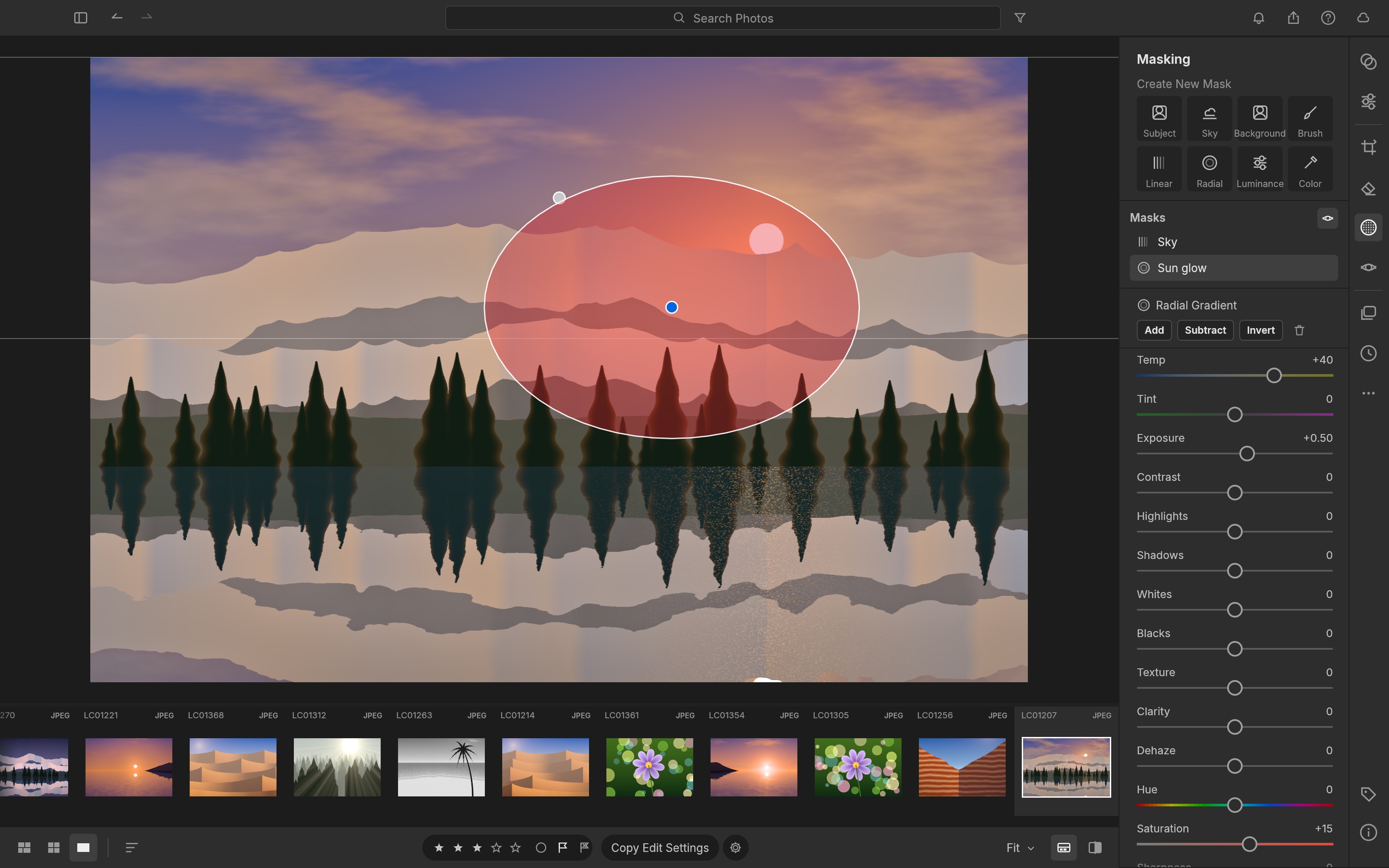
Screenshot: ArtCraft, from the project's own documentation.
The catches. The project tracks its own numbers honestly: about 79 percent of Lightroom's features by count, 98 percent of the core, and 60 to 70 percent as a day-to-day replacement. It names its gaps: camera colour calibration for raws other than DNG, Canon CR3 and compressed Fujifilm and Olympus raws, which open as embedded previews only, and the AI tools, where subject and sky selection use classical methods and neural denoise is an optional model you download separately. A release lands most weeks, so features move between versions.
Who it suits. Lightroom users who want the same panels and their existing edits without the subscription, and photographers on Linux, where it is the rare Lightroom replacement that feels like one.
2. darktable 5.6
darktable is the open source RAW developer serious photographers have used for fifteen years, and the 5.6 release in June 2026 was its biggest in a long time: an optional AI subsystem, off by default, that adds object masks, neural denoise and upscaling with models you download; a colour harmonizer module; HEIF export; a second darkroom window; and support for a fresh batch of cameras. It is GPL licensed and runs on Linux, Windows and macOS.
What it is good at. A scene-referred colour pipeline that photographers who grade seriously prefer to Lightroom's, parametric masks that are more powerful than anything in Lightroom, and a lighttable that handles large libraries.
The catches. The interface rewards patience and punishes the first week, Lightroom edits do not carry across, and the project warns that 5.6 libraries cannot go back to 5.4 and that the documentation has not yet caught up with the release.
Who it suits. Photographers who want the deepest free developer and are willing to learn it.
3. RawTherapee
RawTherapee is a pure RAW converter: no library to speak of, but a developing engine that is respected for demosaicing quality and for how much detail it pulls out of a file. The 5.x series has had steady releases, with 5.13 the newest, and it runs on Windows, macOS and Linux under the GPL.
What it is good at. Image quality from a single RAW file, noise reduction, sharpening and lens correction, with batch processing by profile.
The catches. It is not a library, so culling and organising happen elsewhere, Lightroom edits do not carry across, and the interface is dense.
Who it suits. Photographers who want the best conversion of a chosen frame and manage their files themselves.
4. digiKam 9
digiKam is the open source answer to Lightroom's library half: a catalogue that handles hundreds of thousands of photos, with tags, face recognition, geolocation, ratings, searches and a built-in editor. digiKam 9.0 in March 2026 modernised the interface, added a Survey tool for reviewing a shoot on a second screen, bulk geolocation editing and expanded RAW support, and 9.1 in June added Pixel motion photos and a newer RAW engine. It is GPL licensed and runs on Linux, Windows and macOS.
What it is good at. Organising a lifetime of photos, finding people and places, and keeping metadata in the files rather than a proprietary catalogue.
The catches. The editor is basic next to Lightroom's develop module, so most people pair it with darktable or RawTherapee, and the interface shows its age in places.
Who it suits. Anyone whose problem is the library rather than the developing.
5. Apple Photos
Photos comes with every Mac, iPhone and iPad, it is free, and it is better at RAW than most people think: it opens RAW files from most cameras, offers exposure, colour, curves, levels and selective adjustments, syncs through iCloud, and extensions from other apps plug straight into it. Apple's new RAW engine, announced for this year's operating systems, is aimed first at developers of other apps, so what it changes inside Photos itself is still to be seen.
What it is good at. A no-effort library with face and place recognition, basic RAW development that is good enough for a lot of work, and sharing.
The catches. No masking to speak of, no presets, Apple devices only, and iCloud storage costs money once a RAW library outgrows the free tier.
Who it suits. Apple users who want their photos organised and lightly edited without installing anything.
6. Snapseed
Snapseed is Google's phone editor, and 2026 was its biggest year since launch: version 4.0 in May rebuilt the interface and added batch editing, an in-app camera and one-touch masking, and 4.1 expanded RAW editing to DNG, ARW, RAF, NEF, CR3, ORF and PEF files directly on the phone, with undo and redo inside tools. It is free with no subscriptions, purchases, ads or watermarks, on Android and iOS.
What it is good at. Fast, good-looking edits on a phone, including RAW files from a real camera, with selective adjustments and healing.
The catches. It is a phone app, not a library, Lightroom edits do not carry across, and the iOS rollout of the RAW update trailed Android.
Who it suits. Anyone who edits on a phone and wants more control than a filter.
7. Lightroom mobile, the free plan
Adobe's own Lightroom app on a phone or tablet has a free tier: capture, organising and sharing, and most of the basic editing tools. The catch is the list of premium features, which includes cloud storage and sync, the healing brush, masking, geometry tools, batch editing and RAW editing itself, so RAW files can be viewed and organised for free but not developed.
What it is good at. Lightroom's look and feel for JPEG edits on a phone, with the option to subscribe later and keep everything.
The catches. No RAW editing without paying, which for most people reading this is the whole point, and the free tier exists to sell the subscription.
Who it suits. Phone shooters who edit JPEGs and may subscribe one day.
8. Your camera maker's own software
Every major camera maker gives away a RAW developer for its own files: Nikon NX Studio, Canon Digital Photo Professional, Fujifilm X RAW Studio, Sony Imaging Edge and the rest. They are free, they render colours exactly the way the camera intended, and they support the newest bodies and lens corrections on day one.
What they are good at. Colour accuracy for that brand, in-camera picture styles applied faithfully, and support for compressed RAW formats that open source tools lag on.
The catches. One brand only, slow and dated interfaces, weak or absent libraries, no Lightroom edits, and no reason to learn them beyond colour.
Who they suit. Single-brand shooters who want the maker's colour, often alongside one of the editors above.
How to choose
- You want Lightroom's panels and your existing edits without the subscription. LightCraft.
- You want the deepest free developer and will learn it. darktable.
- You want the best conversion of a single file. RawTherapee.
- Your problem is the library. digiKam, with darktable or RawTherapee for developing.
- You are on Apple hardware and want no effort. Apple Photos.
- You edit on a phone. Snapseed.
- You shoot one brand and want its colour. The maker's software.
What you give up
Every option here gives up Adobe's cloud: the catalogue that follows you between devices, the AI masks and denoise, Lightroom's mobile camera profiles, and the ecosystem of presets sold for it. LightCraft keeps the panels and reads the presets. darktable and RawTherapee give you more control than Lightroom in exchange for the learning. If sync across devices is the thing you cannot live without, the honest answer may be the cheapest Adobe photography plan.
FAQ
Is there a free version of Lightroom? Only on phones and tablets, and without RAW editing. Lightroom's free mobile plan covers capture, organising, sharing and basic JPEG editing. RAW editing, masking, healing, geometry, batch editing and cloud sync are premium.
Which free alternative is most like Lightroom? LightCraft, because it reimplements Lightroom's develop panels, shortcuts and library on purpose, and reads Lightroom's develop settings and presets from XMP sidecars. darktable is more powerful but its interface is its own.
Will my Lightroom edits carry across? With LightCraft, yes: save XMP sidecars from Lightroom and it reads the develop settings and presets. darktable, RawTherapee and digiKam read ratings, labels and keywords from XMP but not the develop settings, so each photo starts from the RAW again.
Which one handles my camera's RAW files? darktable and RawTherapee support the widest range of cameras with proper colour calibration. LightCraft calibrates DNG and opens Canon CR3 and compressed Fujifilm and Olympus raws as embedded previews only for now. Your camera maker's own software always supports its newest bodies first.
Can I use these for client work? Yes. All eight allow commercial use. Open source licences such as the GPL and Apache 2.0 cover the software, not your photographs. Watermarks, naming templates and batch export are built into LightCraft and darktable.
Looking for more? Every tool on Unmetered's free tools board is free software with full source, an install guide and a Claude Code prompt, under one licence for your organization.
Own the software you run.
Unmetered is a curated marketplace where vetted operators sell ready-to-run software, full source, one-time price, licensed to your organization forever.