starters
LightCraft
Free Lightroom alternative
Built from ArtCraft’s public project · 7,859 stars on GitHub
v0.5.0, updated Oct 10, 2026
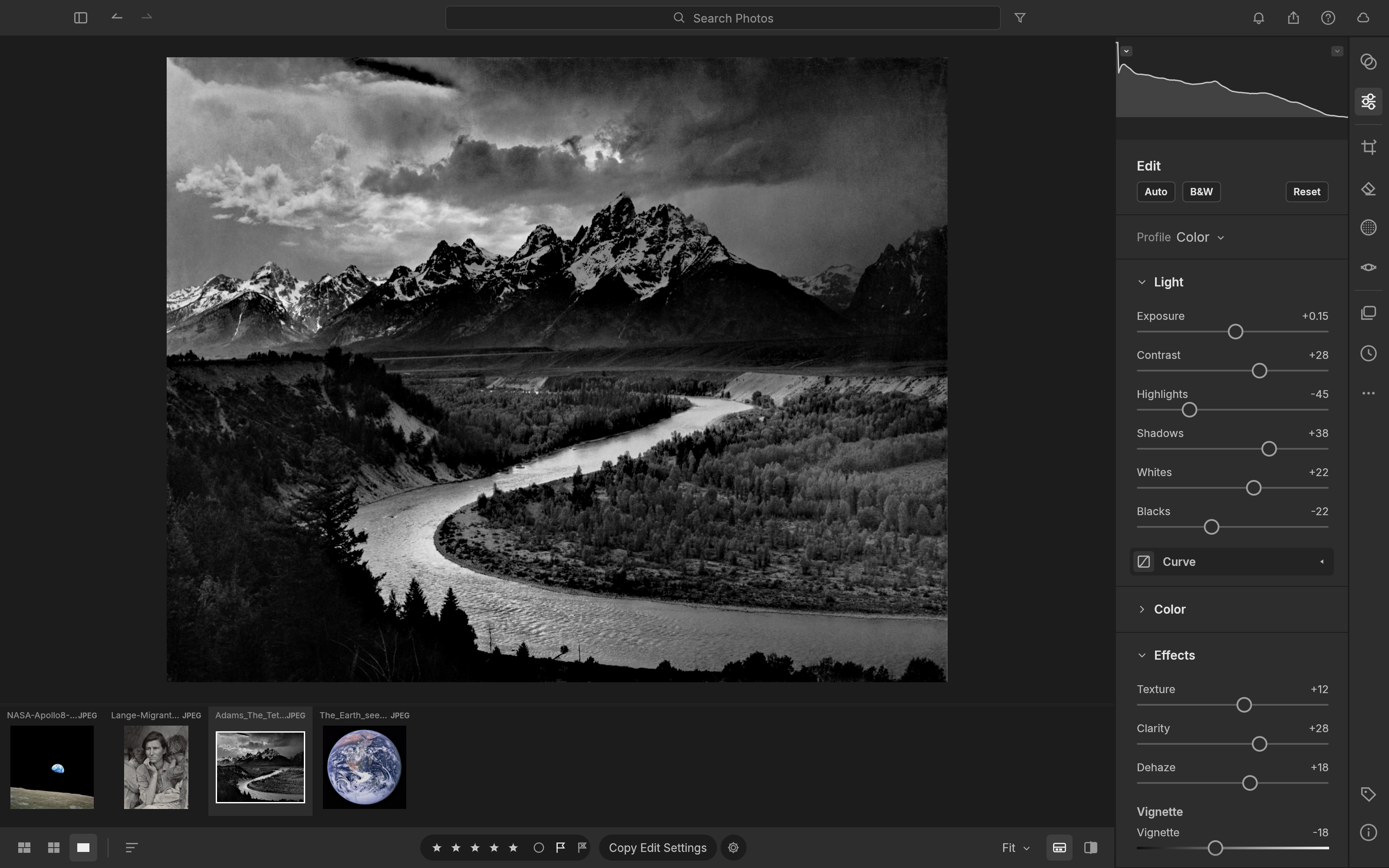
LightCraft is a free Lightroom alternative: an open source photo editor and library for Mac, Windows and Linux with the Light, Color, Effects, Tone Curve, Color Mixer and Color Grading panels, masking, presets and profiles, culling, albums and smart albums, and export with watermarks and naming templates. It is a native app written in Rust, it runs offline, and it never asks for a subscription, an account or a card.
A Lightroom alternative for the whole workflow
LightCraft is a clean-room reimplementation of Lightroom, so the develop panels, keyboard shortcuts and library layout follow what a Lightroom user already knows. Import a shoot, cull it with Compare and Survey views and pick, reject and star keys, develop with the familiar sliders, a tone curve with targeted adjustment, brush, linear, radial and range masks, and heal and clone spots, then export JPEG, PNG, TIFF, WebP, AVIF or DNG in batches. XMP sidecars are read and written, including Lightroom's own develop settings and XMP presets, so an existing catalogue of edits comes across.
The project tracks its own numbers honestly: about 79 percent of Lightroom's features by count, 98 percent of the core, and 60 to 70 percent as a day-to-day replacement. It names its gaps: camera colour calibration for raws other than DNG, Canon CR3 and compressed Fujifilm and Olympus raws, which open as embedded previews only, and the AI masks and denoise, where subject and sky selection use classical heuristics for now.
Free Lightroom alternative for Mac, Windows and Linux
Native builds for every desktop: a universal macOS app for Apple silicon and Intel with a native menu bar, Windows installers and a portable build, Linux AppImage, deb, rpm and Flatpak packages, Nix, and FreeBSD. On Linux it is the rare Lightroom replacement that is a real catalogue and develop module rather than a converter. There is also a browser build you can host yourself, with the library kept in the browser's own storage.
RAW support without a C library in sight
The raw decoders are the project's own Rust code: DNG, Canon CR2, Sony ARW, Nikon NEF, Fujifilm RAF including X-Trans, Panasonic RW2 and Leica RWL, Pentax PEF and Olympus ORF, plus JPEG, PNG, TIFF, WebP, PSD composites and JPEG XL. The pipeline is scene-referred and wide-gamut, edits are resolution independent, and the whole develop chain runs as GPU compute checked against the CPU path, so a slider update re-renders in a few milliseconds on a current laptop and a full-size export takes well under a second.
Open source, no subscription
LightCraft is MIT or Apache 2.0 licensed, built by the ArtCraft Team with more than 7,700 stargazers behind it, and free for good: no monthly fee, no cloud, no telemetry, no features behind a paywall. Your catalogue is a human-readable log you can back up or diff. Every slider and menu item is a command with a stable id, and the same engine drives the app, a command-line tool, a control channel and an MCP server, so you can script a batch develop or let an AI agent cull, develop, mask and export a shoot.
What you get here
The complete source of release 0.4.0 as published by the ArtCraft Team, with the project's own MIT and Apache 2.0 notices inside, plus an install guide written for this listing that covers the prebuilt installers for each platform, the browser build and building from source, and a Claude prompt that walks you through setup.
What you get
How you’ll run it:Full source zipClaude Code prompt, one pasteGuided install
Rustwgpu compute pipeline (Metal, Vulkan, DX12)eguiOwn RAW decoders, no C librariesWebAssembly build
- Full source of LightCraft 0.4.0 as released by the ArtCraft Team: the app, the command-line tool, the MCP server and the
- The project's README, MIT and Apache 2.0 licenses and attribution notices, untouched
- An install guide written for this listing: prebuilt installers, the browser build, building from source
- A Claude prompt that walks you through installing it on your machine
- Links to the prebuilt releases for macOS, Windows, Linux and FreeBSD
Requirements: A Mac (Apple silicon or Intel), a Windows 10 or 11 PC, a Linux machine with a working Vulkan GPU driver, or FreeBSD, and a few hundred megabytes of disk plus room for your photos and previews. Without a GPU the pipeline runs on all CPU cores. The browser build needs a current browser. To build from source: Rust 1.90 or newer from rustup and several minutes for the first compile. No accounts, API keys or network access.
Current version
v0.5.0 · published Oct 10, 2026 · 14865.0 KB
v0.5.0 (release), as published by ArtCraft, replacing v0.4.0. sha256 31d55495c642df78f3fae6f382752e1fbd8f8c9ce18b2e857251c787db924554.
sha256 31d55495c642df78f3fae6f382752e1fbd8f8c9ce18b2e857251c787db924554 · reviewed contents; your download adds a license receipt fingerprinted to your purchase
Reviews
Verified purchases only. You can't review what you don't own.
No reviews yet.