Best free After Effects alternatives in 2026
Colby Flood · October 26, 2026 · 11 min read
After Effects has no real rival for what it is: the place where motion graphics, compositing and the hundred small animation jobs of a video career get done, with thirty years of tutorials, templates and plug-ins behind it. It also costs around twenty-three dollars a month on its own and about three times that inside Creative Cloud Pro, which is why the question "what is the free alternative" comes up more every year. In 2026 the answer has changed: Canva made Cavalry free, Blackmagic's Fusion is free inside DaVinci Resolve, Blender's compositor and sequencer had their biggest year, and a new open source project reimplements After Effects' own panels, shortcuts and every one of its effects.
This guide compares eight free After Effects alternatives on the things that decide whether a switch sticks: whether it is a layer-based or node-based tool, what it does for motion graphics against compositing, whether your muscle memory carries over, what platforms it runs on, and what "free" actually means in each case. The list starts with our pick, and every entry says where it falls short.
Quick picks
- Our pick for After Effects users: EffectCraft, open source, built to After Effects' own panels, shortcuts and effects, Mac, Windows and Linux, no subscription. Early, so try things in it rather than bet a client job on it yet.
- Most capable free compositor: Fusion, inside the free DaVinci Resolve.
- Best free 2D motion design tool: Cavalry, free for individuals since April 2026.
- If you already use Blender: its compositor, geometry nodes and sequencer.
- Classic node compositor: Natron, open source and slow-moving.
- Open source 2D animation on a timeline: Friction.
- Interactive animation for apps and web: Rive, free to learn, paid to ship.
- Hand-drawn and cut-out animation: Synfig Studio.
How we judged them
Layers or nodes. After Effects thinks in layers on a timeline. Compositors think in node graphs. Both work; moving between them is the biggest change you will feel.
Motion graphics or compositing. Lower thirds, logo animations and explainer videos are one job. Keying, tracking and clean-up are another. Few tools do both as well as After Effects.
Muscle memory. Whether the shortcuts, panels and vocabulary carry over, or whether every day starts with a search.
Platforms. Mac, Windows and Linux.
What free means. Open source and free for good is one thing. A company's free edition that could change tomorrow is another. A free tier you cannot export from is a third. We name the catch each time.
1. EffectCraft
EffectCraft is an open source motion graphics and compositing app for Mac, Windows and Linux with the Project, Composition, Timeline, Effect Controls and Render Queue panels an After Effects user expects, keyframes with a Graph Editor, shape and text layers, masks and track mattes, expressions, Classic 3D with cameras and lights, and 306 effects. It is a native app written in Rust, it runs offline, it never asks for a subscription, an account or a card, and it is released under the Apache 2.0 licence.
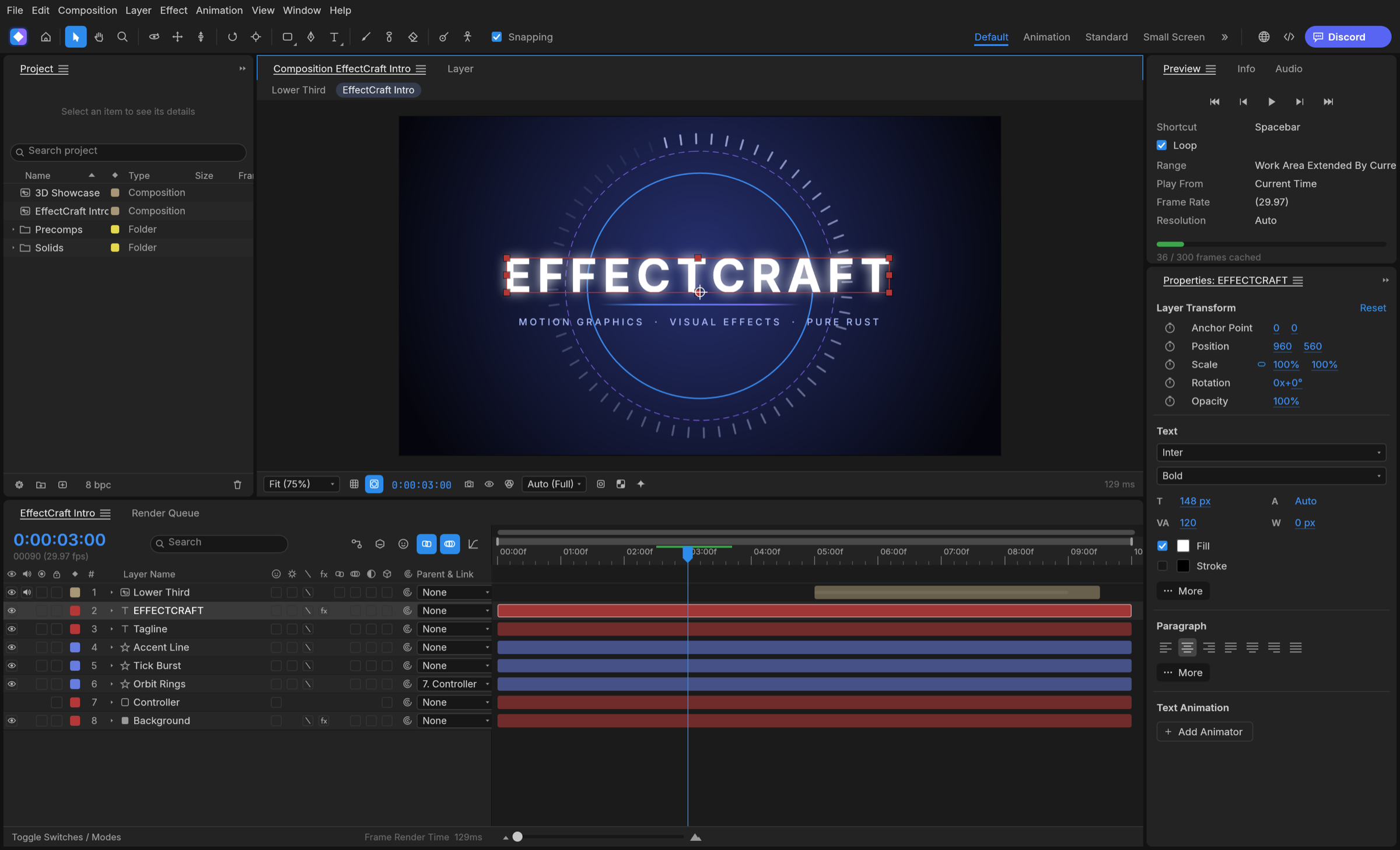
Screenshot: ArtCraft, from the project's own documentation.
What it is good at. Keeping your muscle memory. It is a clean-room reimplementation of After Effects, so the panels, menus and shortcuts follow the original: twirl a layer open to Transform, masks and effects, the A, P, S, R and T property shortcuts and their double presses, Easy Ease on F9, time remapping, markers and a work area, all at exact frame accuracy including 29.97 drop-frame. Layers come in every kind, with parenting, track mattes, all 38 blend modes and motion blur. Expressions are JavaScript with the After Effects object model, wiggle, loopOut and the pick-whip included. Every one of After Effects' 298 effects is there with its parameter names, order and defaults, plus a few more, and the Render Queue writes video without FFmpeg.
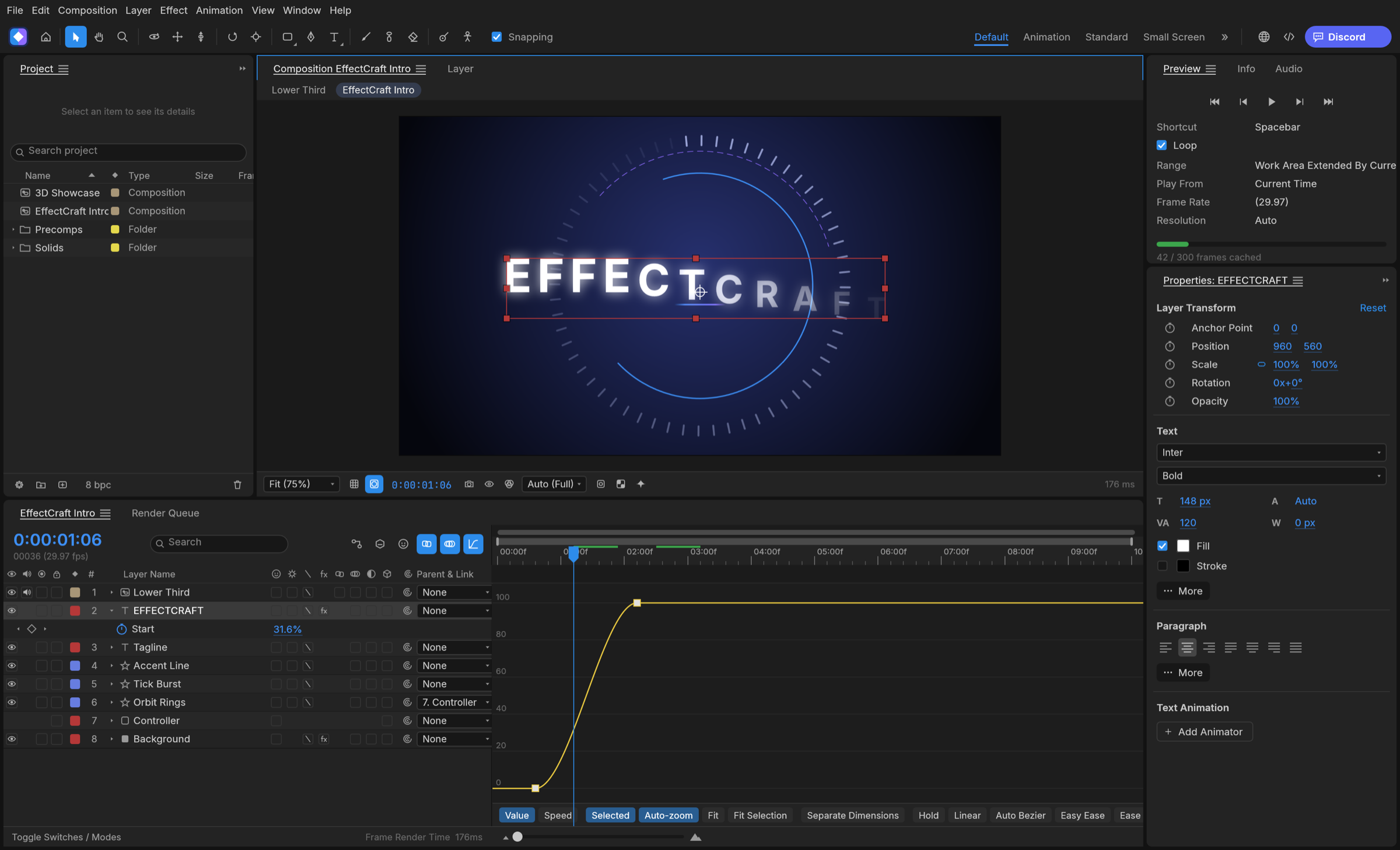
Screenshot: ArtCraft, from the project's own documentation.
The catches. The project is honest about where it stands: its first commit was 1 October 2026, nearly every After Effects feature exists, but behaviour has not yet been measured against After Effects, it cannot open .aep projects or run After Effects plug-ins, macOS is the most tested platform, and the team says plainly that it is not yet a replacement on client work. A release lands most weeks, so features move between versions.
Who it suits. After Effects users who want the same tool without the subscription and are happy to try things in a young project, students, and anyone on Linux who has never had an After Effects-shaped option before.
2. Fusion, inside DaVinci Resolve
Fusion is a feature-film compositor that Blackmagic folded into DaVinci Resolve, and the free version of Resolve includes it: node-based compositing, 3D, particles, keying, planar and camera tracking, and a full set of effects, with no watermark and no time limit. The paid Studio version is a one-time purchase of about 295 dollars and adds export above Ultra HD, some advanced effects and the AI tools.
What it is good at. Serious compositing and effects work, and motion graphics once you think in nodes, all inside the editor you may already be using.
The catches. Nodes, not layers, so After Effects habits do not transfer, text and shape animation are more laborious than in a layer tool, and the whole application wants a capable graphics card.
Who it suits. Editors already in Resolve, and anyone whose work is more compositing than motion design.
3. Cavalry
Cavalry is a 2D motion design application built for the kind of work After Effects is most often used for: procedural animation, data-driven graphics, lower thirds, explainer videos, with a node and layer hybrid that scales to hundreds of elements. In April 2026 Canva, which acquired it, made the full version free for individuals including commercial work, with studios needing a paid Canva account for team features.
What it is good at. Procedural and repetitive motion design that would take hours of keyframing in After Effects, and clean exports in standard formats.
The catches. It is not a compositor, so keying and tracking live elsewhere, its logic takes a week to click for After Effects users, and "free from a company" is a promise rather than a licence.
Who it suits. Motion designers who make graphics rather than composite footage.
4. Blender
Blender is a 3D suite, but three of its parts matter here: a node compositor, geometry nodes for procedural motion graphics, and the Video Sequencer, which Blender 5.0 overhauled in November 2025 with hardware-accelerated scopes, a slip tool and a compositor modifier that runs node trees inside the timeline. It is free and open source under the GPL on every desktop platform.
What it is good at. 3D motion graphics, title animations with real lighting and materials, and compositing rendered elements with footage, all in one application with a vast community.
The catches. Nothing about it resembles After Effects, 2D animation on a timeline is clumsy next to a dedicated tool, and the learning curve is the steepest on this list.
Who it suits. Anyone whose motion graphics are mostly 3D, and Blender users who want to stop round-tripping.
5. Natron
Natron is the open source node compositor that was built to feel like Nuke: nodes, roto, keying, tracking, OpenFX plug-in support and a deep render pipeline, under the GPL on Linux, macOS and Windows. The current release is 2.5, and the project is openly looking for maintainers, with development slow for the past year.
What it is good at. Classic compositing jobs on a modest machine, and running the same OpenFX plug-ins commercial compositors use.
The catches. Nodes only, no motion graphics tooling to speak of, an interface from an earlier decade, and a maintenance situation you should know about before building a pipeline on it.
Who it suits. Compositors who want a free Nuke-style tool and can live with slow updates.
6. Friction
Friction is an open source 2D motion graphics and animation application for Windows, macOS and Linux, built around vector and raster layers on a timeline with keyframes, expressions, effects and SVG import and export. Its 1.0 release candidates arrived in early 2026 after a long 0.9 series, and it is published under the GPL.
What it is good at. Timeline-based 2D animation that feels closer to After Effects or Animate than a node compositor does, with vector tools built in.
The catches. It is a small project with a small team, the feature set is a fraction of After Effects', and the 1.0 line is still settling.
Who it suits. Animators who want an open source timeline tool for 2D work and do not need compositing.
7. Rive
Rive is a browser-based animation tool for interactive graphics that run inside apps, games and websites through its runtimes, with a state machine that turns animations into interactive components. The free tier lets you design and animate without limit on personal files, but exporting the .riv files that ship animations into a product needs a paid plan, which starts at around nine dollars a seat.
What it is good at. Interactive animation that a developer drops into an app, which After Effects was never built for.
The catches. Free to learn, paid to ship, a web app rather than software you own, and no video compositing at all.
Who it suits. Product designers and developers animating interface elements, not video editors.
8. Synfig Studio
Synfig Studio is the long-running open source 2D animation program for cut-out and tweened animation: bones, vector shapes, layers, and a timeline that interpolates between keyframes, under the GPL on Windows, macOS and Linux. The stable release is 1.4, with a 1.5 development series that reached 1.5.5 in March 2026.
What it is good at. Character and cut-out animation without drawing every frame, for free, on any desktop.
The catches. It is an animation tool rather than a motion graphics or compositing one, the interface is dated, and the stable line moves slowly.
Who it suits. Animators making characters and cartoons rather than video graphics.
How to choose
- You know After Effects and want the same tool without the subscription. EffectCraft, with the caveats above.
- Your work is compositing and you have a real computer. Fusion inside DaVinci Resolve.
- Your work is motion design and you do not need compositing. Cavalry.
- Your graphics are 3D. Blender.
- You want a free Nuke. Natron.
- You want open source 2D animation on a timeline. Friction, or Synfig Studio for characters.
- Your animations go into an app. Rive.
What you give up
Every option here gives up the After Effects ecosystem: the plug-in market, the template libraries, Dynamic Link with Premiere, and the thousands of tutorials that assume the real thing. EffectCraft keeps the panels, shortcuts and effects but cannot open your old projects or plug-ins. Fusion and Blender give you more power than After Effects in exchange for thinking in nodes. If the plug-ins and templates are the job, the honest answer may be the single-app subscription.
FAQ
Is there a free version of After Effects? No. Adobe offers a seven-day trial, and After Effects is otherwise subscription only, at around twenty-three dollars a month on its own on an annual plan. The tools above are free in different ways: open source and free for good (EffectCraft, Blender, Natron, Friction, Synfig), a company's free edition (Cavalry, Fusion inside DaVinci Resolve), or a free tier that cannot export (Rive).
Which free alternative is most like After Effects? EffectCraft, because it reimplements After Effects' panels, shortcuts, expressions and all 298 effects on purpose. Nothing else on the list tries to.
Can I open my After Effects projects in any of these? Not directly. EffectCraft cannot read .aep files yet, and no other tool here reads them at all. Export rendered elements, or rebuild the project.
Is EffectCraft ready for client work? The project itself says not yet: its first commit was in October 2026, its behaviour has not been measured against After Effects, and it cannot run After Effects plug-ins. It is a free place to work the way you already know and to watch a fast-moving project grow.
What is the best free tool for motion graphics specifically? Cavalry, now that it is free for individuals, for 2D procedural work. Blender for 3D. EffectCraft if you want After Effects' own workflow.
Looking for more? Every tool on Unmetered's free tools board is free software with full source, an install guide and a Claude Code prompt, under one licence for your organization.
Own the software you run.
Unmetered is a curated marketplace where vetted operators sell ready-to-run software, full source, one-time price, licensed to your organization forever.