starters
EffectCraft
Free After Effects alternative
Built from ArtCraft’s public project · 3,972 stars on GitHub
v0.7.0, updated Oct 10, 2026
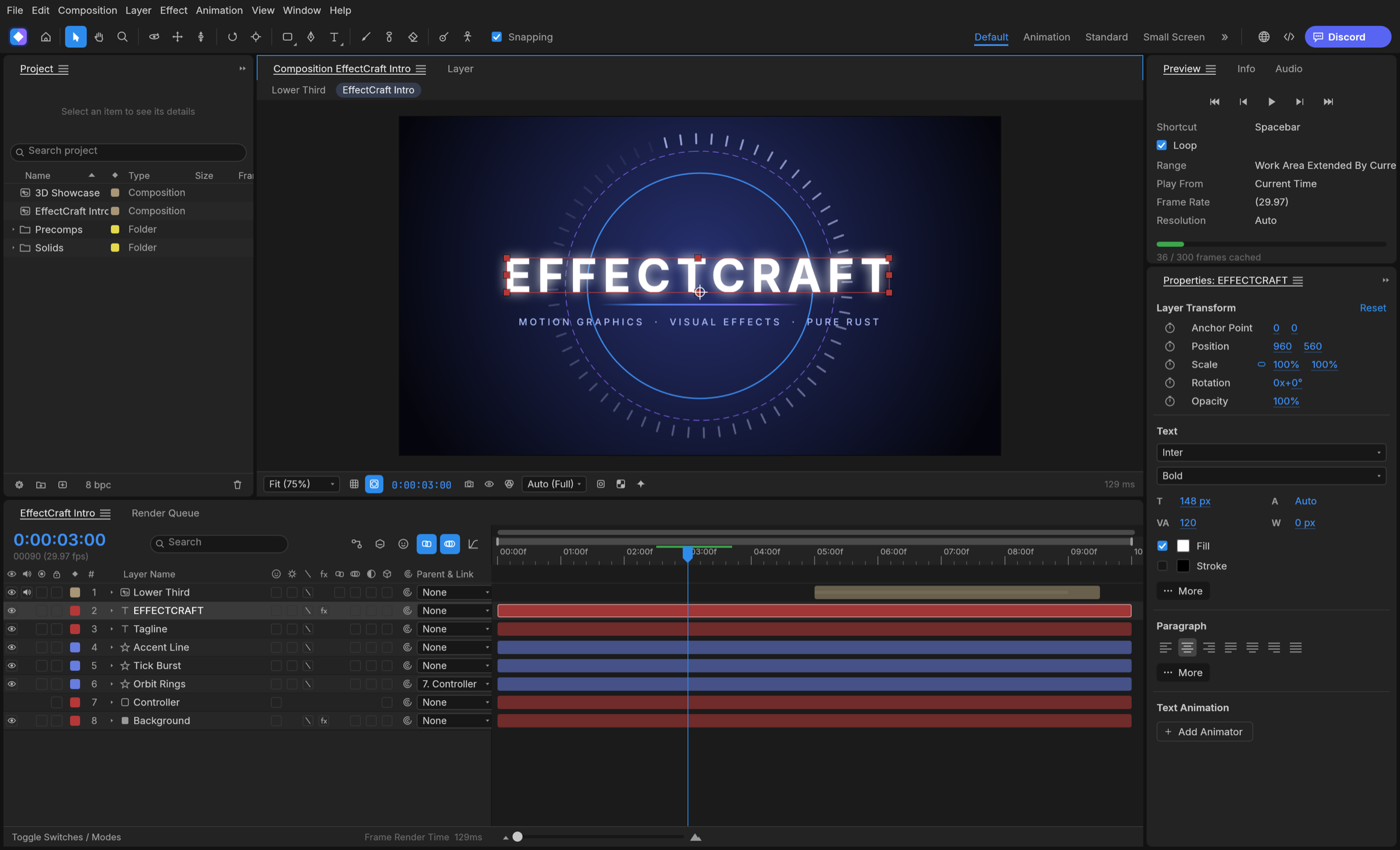
EffectCraft is a free After Effects alternative: an open source motion graphics and compositing app for Mac, Windows and Linux with the Project, Composition, Timeline, Effect Controls and Render Queue panels an After Effects user expects, keyframes with a Graph Editor, shape and text layers, masks and track mattes, expressions, Classic 3D with cameras and lights, and 306 effects. It is a native app written in Rust, it runs offline, and it never asks for a subscription, an account or a card.
An After Effects alternative that keeps your muscle memory
EffectCraft is a clean-room reimplementation of After Effects, so the panels, menus and shortcuts follow the original: twirl a layer open to Transform, masks and effects, the A, P, S, R, T property shortcuts and their double presses, Easy Ease on F9, the Keyframe Velocity and Interpolation dialogs, time remapping, markers and a work area, all at exact frame accuracy including 29.97 drop-frame. Layers come in every kind, solids, shapes, text, footage, nested compositions, nulls, adjustment layers, cameras and lights, with parenting, track mattes, all 38 blend modes and motion blur. Expressions are JavaScript with the After Effects object model, wiggle, loopOut and the pick-whip included, and the puppet tools pin and rig a layer with follow-through.
The project is honest about where it stands: its first commit was 1 October 2026, nearly every After Effects feature exists, including all of its effects, but behaviour has not yet been measured against After Effects, it cannot open .aep projects or run After Effects plug-ins, and macOS is the most tested platform. The team says plainly that it is not yet a replacement on client work; it is a place to try things, and a free one.
306 effects, Classic 3D and a Render Queue without FFmpeg
Every one of After Effects' 298 effects is there with its parameter names, order and defaults, plus a few more: Curves, Levels and Lumetri Color, Warp and Turbulent Displace, Fractal Noise and Gradient Ramp, keying and mattes, CC Particle World, Shatter and Card Dance, Glow, Echo and Timewarp, audio effects, and all nine Layer Styles with Global Light. Classic 3D brings 3D layers, one and two-node cameras with depth of field, parallel, spot, point and ambient lights with soft ray-traced shadows, and orbit, pan and dolly tools. The Render Queue writes H.264 MP4, ProRes MOV up to 4444 XQ with alpha, HEVC and AV1 MP4, WebM with VP9 or AV1 and Opus, PNG, JPEG, TIFF and 32-bit EXR sequences, animated GIF and WAV, with every encoder written in Rust. Lottie goes both ways, so an animation can leave for the web or an app without a plug-in.
Free After Effects alternative for Mac, Windows and Linux
Native builds for every desktop: a universal macOS app, Windows installers for x64, x86 and ARM64 with no emulation, Linux AppImage, deb, rpm and Flatpak packages, and FreeBSD. There is also a browser build you can host yourself. Projects are readable, versioned JSON that diff cleanly in version control.
Open source, no subscription
EffectCraft is MIT or Apache 2.0 licensed, built by the ArtCraft Team with more than 3,900 stargazers behind it, and free for good: no monthly fee, no trial that expires, no features behind a paywall, and no network access unless you ask for it. Every menu item is a command with an id, and the same registry drives the app, a command-line tool that sets properties and renders compositions headless, a control channel and an MCP server, so Claude or another agent can build and render a composition the way a person would.
What you get here
The complete source of release 0.7.0 as published by the ArtCraft Team, with the project's own MIT and Apache 2.0 notices inside, plus an install guide written for this listing that covers the prebuilt installers for each platform, the browser build and building from source, and a Claude prompt that walks you through setup.
What you get
How you’ll run it:Full source zipClaude Code prompt, one pasteGuided install
RusteguiOwn VP9, AV1, HEVC and Opus encoders, FilmCraft's H.264, ProRes and AACLottie import and exportWebAssembly build
- Full source of EffectCraft 0.7.0 as released by the ArtCraft Team: the app, the command-line tool, the MCP server and th
- The project's README, MIT and Apache 2.0 licenses and attribution notices, untouched
- An install guide written for this listing: prebuilt installers, the browser build, building from source
- A Claude prompt that walks you through installing it on your machine
- Links to the prebuilt releases for macOS, Windows, Linux and FreeBSD
Requirements: A Mac (Apple silicon or Intel), a Windows 10 or 11 PC (x64, x86 or ARM64), a Linux machine with a working GPU driver, or FreeBSD, and a few hundred megabytes of disk plus room for your footage and renders. The optional Roto Brush and face-tracking models are separate downloads from the app's settings (40 MB and 4 MB). The browser build needs a current browser. To build from source: Rust 1.95 or newer from rustup and several minutes for the first compile. No accounts, API keys or network access.
Current version
v0.7.0 · published Oct 10, 2026 · 11117.8 KB
v0.7.0 (release), as published by ArtCraft, replacing v0.6.0. sha256 d484815bacf4570e427fe54793c1341ee98bdc4584d8b81a7ded04e21a1312c9.
sha256 d484815bacf4570e427fe54793c1341ee98bdc4584d8b81a7ded04e21a1312c9 · reviewed contents; your download adds a license receipt fingerprinted to your purchase
Reviews
Verified purchases only. You can't review what you don't own.
No reviews yet.