starters
PdfCraft
Free Adobe Acrobat alternative
Built from ArtCraft’s public project · 6,565 stars on GitHub
v0.5.0, updated Oct 10, 2026
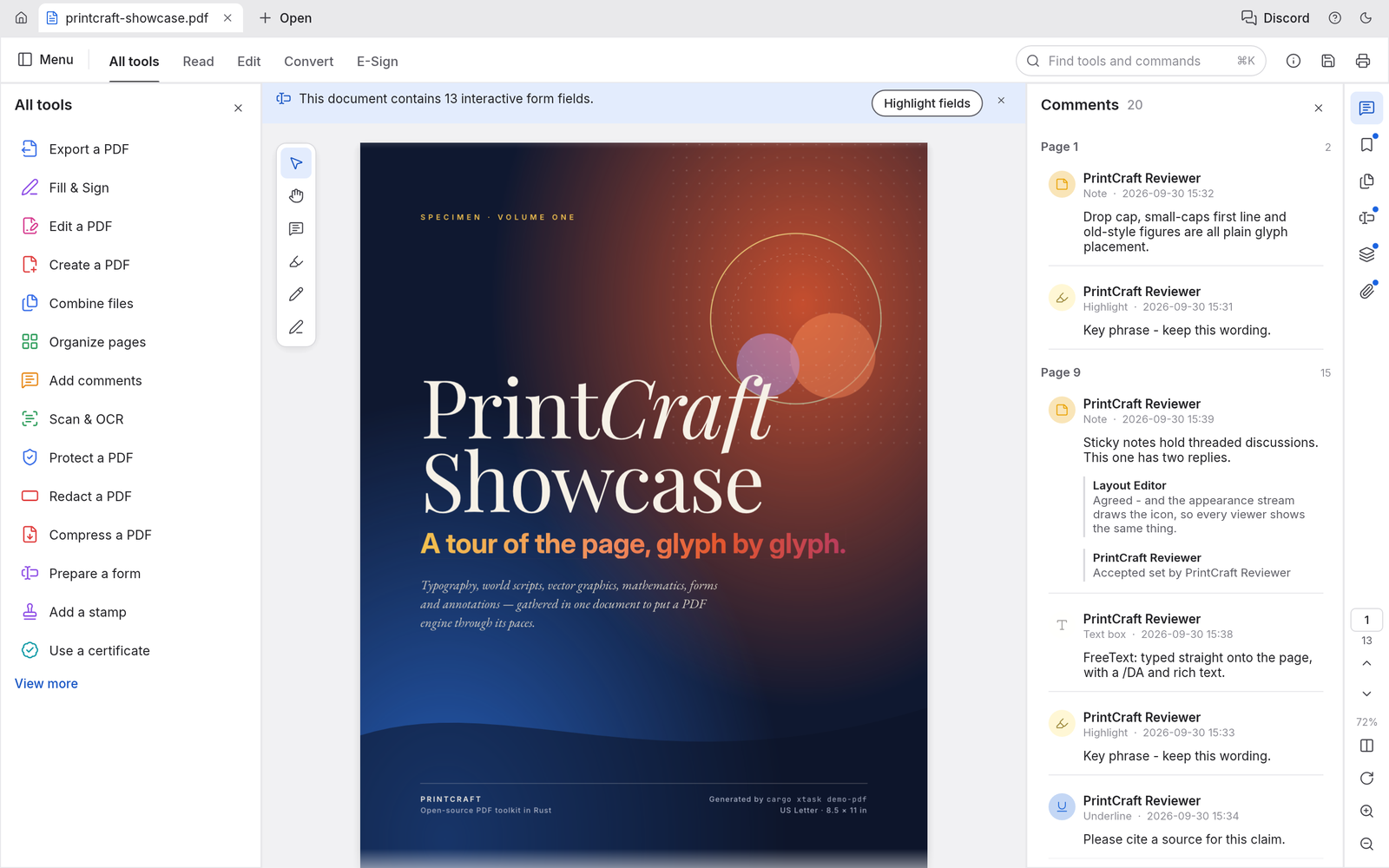
PdfCraft is a free Adobe Acrobat alternative: an open source PDF editor for Mac, Windows and Linux that views and searches PDFs, organizes, combines and splits pages, fills and builds forms, adds comments, redacts, protects with passwords and signs, with a command-line tool and an MCP server for automation. It is a native app written in Rust, it runs offline, and it never asks for a subscription, an account or a card.
An Adobe Acrobat replacement for everyday PDF work
Open Organize pages to rotate, delete, move and insert pages like cards on a table, combine files into one document with bookmarks for each, extract or split without losing links, form fields, layers or attachments, fill and author interactive forms, and leave threaded comments. Password protection covers every revision of the PDF standard from 40-bit RC4 to AES-256, with permissions honoured and edits saved encrypted. Every save is incremental and atomic, so the original bytes stay intact, undo still works after saving, changes autosave every minute, and a crash offers recovery on the next launch.
The project tracks its own numbers honestly: about half of Acrobat Pro's offline features are in, 88 percent of the must-haves, and it names what is still thin: reliable editing of existing text (especially CJK), OCR beyond Latin script, Office import and export, signature timestamps, PDF/A preflight and XFA forms. Viewing, search, organizing, comments, forms, passwords, redaction, basic digital signatures, printing and the accessibility checker are the parts it calls good today.
Free PDF editor for Mac, Windows and Linux
Native builds for every desktop: a universal macOS app, Windows installers for x64, x86 and ARM64 with no emulation, Linux AppImage, deb, rpm and Flatpak packages, and FreeBSD. There is also a browser build you can host yourself. Documents never leave your machine: no account, no telemetry, no cloud processing.
Renders faithfully, survives bad files
Kerning and ligatures, right-to-left and complex scripts, vertical Japanese, colour emoji, shadings, blend modes, soft masks and optional content all render the way the author intended, and large pages render in tiles so text stays crisp at any zoom. Damaged files are repaired page by page: across the 983-file pdf.js test corpus the project reports zero crashes. Light and dark themes, continuous, single, two-up and distraction-free Read layouts, bookmarks, thumbnails and the document's own page labels keep long documents navigable.
Open source, no subscription
PdfCraft is MIT or Apache 2.0 licensed, built by the ArtCraft Team with more than 6,400 stargazers behind it, and free for good: no monthly fee, no trial that expires, no features behind a paywall. The same engine drives the app, a command-line tool that inspects, renders, extracts text, edits, combines and splits, and an opt-in MCP server confined to one folder, so Claude or another agent can highlight a phrase by naming it, fill a form or split a report without the window open.
What you get here
The complete source of release 0.5.0 as published by the ArtCraft Team, with the project's own MIT and Apache 2.0 notices inside, plus an install guide written for this listing that covers the prebuilt installers for each platform, the browser build and building from source, and a Claude prompt that walks you through setup.
What you get
How you’ll run it:Full source zipClaude Code prompt, one pasteGuided install
RusteguiOwn PDF parser, filters, crypto and forms cratesWebAssembly buildCLI and opt-in MCP server
- Full source of PdfCraft 0.5.0 as released by the ArtCraft Team: the app, the command-line tool, the MCP server and the e
- The project's README, MIT and Apache 2.0 licenses and attribution notices, untouched
- An install guide written for this listing: prebuilt installers, the browser build, building from source
- A Claude prompt that walks you through installing it on your machine
- Links to the prebuilt releases for macOS, Windows, Linux and FreeBSD
Requirements: A Mac (Apple silicon or Intel), a Windows 10 or 11 PC (x64, x86 or ARM64), a Linux machine, or FreeBSD, and a few hundred megabytes of disk. The browser build needs a current browser. To build from source: Rust 1.90 or newer from rustup and several minutes for the first compile. No accounts, API keys or network access.
Current version
v0.5.0 · published Oct 10, 2026 · 13298.2 KB
v0.5.0 (release), as published by ArtCraft, replacing v0.4.0. sha256 ba50cf86e1dcabf42a2c13e8e42aa60365c4a8fb47d7c59cbf0c28adef83fc11.
sha256 ba50cf86e1dcabf42a2c13e8e42aa60365c4a8fb47d7c59cbf0c28adef83fc11 · reviewed contents; your download adds a license receipt fingerprinted to your purchase
Reviews
Verified purchases only. You can't review what you don't own.
No reviews yet.