starters
PhotoCraft
Free Photoshop alternative
Built from ArtCraft’s public project · 36,115 stars on GitHub
1 salev0.6.0, updated Oct 10, 2026
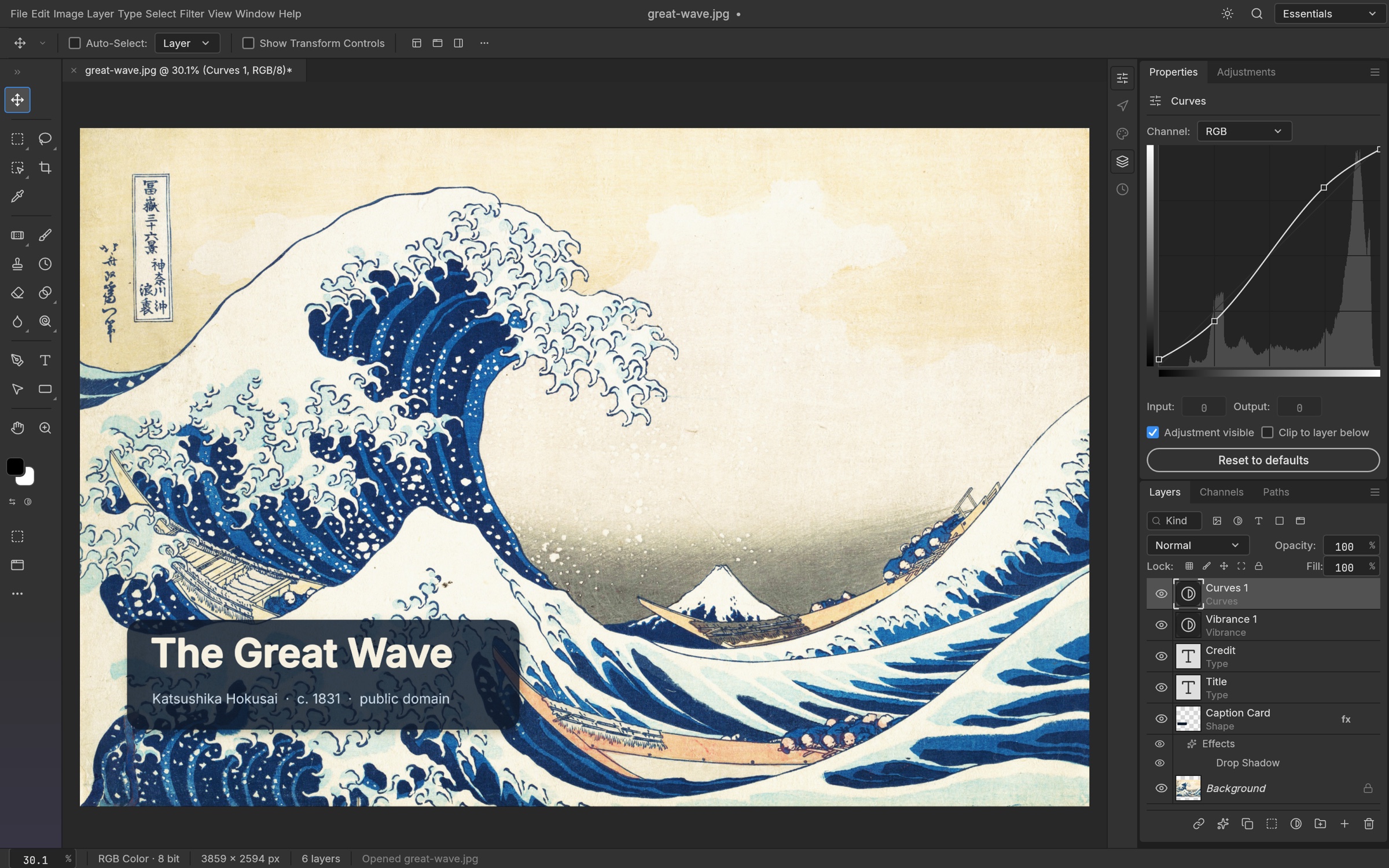
PhotoCraft is a free Photoshop alternative: an open source image editor for Mac, Windows and Linux that opens, edits and saves real PSD files, with layers, masks, adjustment layers, layer styles, type, vector shapes, brushes and filters. It is a native app written in Rust, it runs offline, and it never asks for a subscription, an account or a card.
A Photoshop replacement for everyday work
If you want software like Photoshop but free, this is the closest thing to the real tool rather than a lighter photo editor. Agencies and creators get retouching, adjustments, compositing, type and export for client work without a Creative Cloud seat, and the files stay compatible with anyone still on Photoshop. The project describes itself as early alpha, so expect gaps against the full Photoshop feature set; it is already strong on layers, adjustments and PSD compatibility, and a new release lands most weeks.
Edit PSD files without Photoshop
PSD support is built in rather than bolted on: open a layered PSD from a client or a designer, keep the layers, masks and adjustment layers intact, edit, and save it back as a PSD or export to PNG, JPEG and the other formats you deliver. That makes it a free program to edit PSD files for the people on a team who only need to touch them now and then.
Free Photoshop alternative for Mac, Windows and Linux
Native builds for every desktop: a universal macOS app for Apple silicon and Intel, Windows installers and a portable build, Linux AppImage, deb, rpm and Flatpak packages, and FreeBSD. There is also a browser build you can host yourself for an online Photoshop alternative that runs on your own domain. GPU compositing through Metal, Vulkan, DX12 or WebGPU keeps large files quick.
Open source, no subscription
PhotoCraft is MIT or Apache 2.0 licensed, built by the ArtCraft Team and more than 35,000 stargazers' worth of community, and free for good: no monthly fee, no trial that expires, no features behind a paywall. The same command engine drives the app, a command-line tool and an MCP server, so you can script edits, apply one action list to a whole folder, or let an AI agent drive it.
What you get here
The complete source of release 0.6.0 as published by the ArtCraft Team, with the project's own MIT and Apache 2.0 notices inside, plus an install guide written for this listing that covers the prebuilt installers for each platform, the browser build and building from source, and a Claude prompt that walks you through setup.
What you get
How you’ll run it:Full source zipClaude Code prompt, one pasteGuided install
Rustwgpu (Metal, Vulkan, DX12, WebGPU)eguiWebAssembly build
- Full source of PhotoCraft 0.6.0 as released by the ArtCraft Team: the app, the command-line tool, the MCP server and the
- The project's README, MIT and Apache 2.0 licenses and attribution notices, untouched
- An install guide written for this listing: prebuilt installers, the browser build, building from source
- A Claude prompt that walks you through installing it on your machine
- Links to the prebuilt releases for macOS, Windows, Linux and FreeBSD
Requirements: A Mac (Apple silicon or Intel), a Windows 10 or 11 PC, a Linux machine with a working Vulkan GPU driver, or FreeBSD, and a few hundred megabytes of disk. The browser build needs a current browser with WebGPU. To build from source: Rust 1.95 or newer from rustup and a few minutes for the first compile. No accounts, API keys or network access.
Current version
v0.6.0 · published Oct 10, 2026 · 16298.8 KB
v0.6.0 (release), as published by ArtCraft, replacing v0.5.0. sha256 d7e0db5115ad3d3c9fb8caff080d50b780c57fa6171ac84b796756cbb3e8210d.
sha256 d7e0db5115ad3d3c9fb8caff080d50b780c57fa6171ac84b796756cbb3e8210d · reviewed contents; your download adds a license receipt fingerprinted to your purchase
Reviews
Verified purchases only. You can't review what you don't own.
No reviews yet.